
3 Things Making Your Website Slow (That Cost You Money)
Half your mobile visitors leave before your homepage finishes loading. Three culprits cause almost all of it, and none of them are your fault.
A homeowner’s water heater just started leaking into the basement. They grab their phone, search “water heater repair near me,” and tap the first result that looks local.
If that page takes six seconds to load, they’re gone. Not because they judged your work or your prices. They never saw either one. They hit back and tapped the next guy.
Google has studied this at scale. Their research found that when load time goes from one second to three seconds, the probability of someone bouncing goes up 32%. At five seconds it’s 90%. They also found that 53% of mobile visits get abandoned when a page takes longer than three seconds.
That’s the part that stings. You paid for the site. You may be paying for ads pointing at it. And half the people clicking through never make it to your phone number.
Here’s the good news: almost every slow contractor website is slow for the same three reasons. None of them are your fault. All of them are fixable.
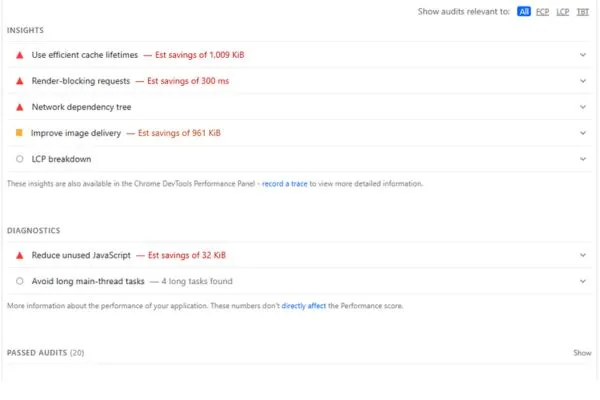
Before you keep reading, go get your own score. Open PageSpeed Insights, paste in your homepage URL, and look at the Mobile tab, not desktop. Desktop scores are flattering and mostly meaningless. Your customers are standing in a wet basement holding a phone.
JavaScript: everything that has to load before your page can
JavaScript is code that runs inside your visitor’s browser. Every piece of it has to download and then execute before the page finishes rendering. A little of it is fine and normal. Most contractor sites are carrying a lot more than a little.
It usually comes from three places.
Your page builder. If your site was built with Elementor, Divi, or WPBakery, it’s loading that builder’s entire code library on every page. A simple “About Us” page with three paragraphs and a photo pulls down the same machinery as a page with animations and sliders and popups. It doesn’t check what the page actually needs.
Plugin pileup. The average WordPress contractor site I look at has somewhere between 20 and 40 active plugins. Most of them inject scripts into every single page whether that page uses the feature or not. A contact form plugin loading its code on your service area pages. A gallery plugin loading on your blog.
Third-party widgets. This is the big one, and it’s the one most worth your attention. Live chat bubbles. Review carousels pulling from Google. Booking embeds. Facebook pixels. Analytics from your current marketing company, plus leftover tracking from the last two you fired and never removed.
A single chat widget can add half a megabyte and block your page from rendering while it phones home to someone else’s server. You are waiting on a company you don’t control, on a server you don’t pay for, before your own headline shows up.
How to spot it: In your PageSpeed report, look for “Reduce unused JavaScript” and “Reduce the impact of third-party code.” That second one will list the specific offenders by name.
What to do about it:
Start by removing things. Go through your plugin list and deactivate anything nobody uses. Pull out tracking scripts from vendors who no longer work for you. This costs nothing and it’s often the single biggest win available.
Next, delay your third-party scripts so they don’t load until someone actually interacts with the page. Chat widgets especially. Nobody needs the chat bubble in the first two seconds. They need to see that you do water heaters.
After that, you’re into conditional loading, where scripts only run on the pages that need them. That one usually takes a developer.
And the real fix, if you ever rebuild: a site that ships almost no JavaScript in the first place. Most contractor websites are brochures with a form on them. They do not need a small application’s worth of code to display a phone number.
Images: photos straight off the phone
This is the most common problem I find on contractor sites, and it comes from a good instinct done wrong.
You take real photos of real jobs. Good. That’s more than most of your competitors do, and homeowners can tell the difference between your crew on a roof and a stock photo of a smiling model holding a wrench.
The problem is what happens next. A photo off an iPhone is around 4,000 pixels wide and can run 3 to 5 megabytes. On your site it displays at maybe 800 pixels. The browser downloads all 5 megabytes anyway, then shrinks it. Do that eight times on a gallery page and you’ve built a 40 megabyte web page.
Three things matter here.
Dimensions. Nothing on a website needs to be wider than about 2,000 pixels. Resize before you upload. Your phone’s photo app can do it, or use a free tool like Squoosh.
Format. JPEG is the old default and it works, but WebP files are roughly 25 to 35% smaller at the same visual quality, and every browser that matters supports it now. Save PNG for logos and anything that needs a transparent background. PNG is a terrible choice for photographs and a lot of sites use it anyway.
Loading behavior. Images below the fold should lazy load, meaning the browser waits to fetch them until the visitor scrolls near them. Your hero image, the big one at the top, should do the opposite. Preload it. It’s usually the largest thing on the screen and it’s usually what’s dragging your score down.
What to do about it:
If you’re on WordPress, a conversion plugin will handle WebP for existing images and get you most of the way there. Understand that this is a bandage over a habit. The real fix is resizing photos before they go up, every time.
If you have a background video on your homepage, that belongs in this section too. Replace it with a still frame. A slow drone pan over a truck is costing you calls and converting nobody.
Hosting: how long your server takes to answer the phone
The first two problems happen after your page starts loading. This one happens before.
When someone requests your page, your server has to build it and send it back. On a $4 a month shared hosting plan, your site sits on a machine with hundreds of other sites, all competing for the same processor and memory. WordPress then has to run PHP, query a database, and assemble the page from scratch on every request.
The measurement for this is Time to First Byte. Under 200 milliseconds is good. Under 600 is acceptable. I regularly see contractor sites at 1.5 to 2 seconds, and that’s two full seconds burned before a single image or line of text has even started downloading.
You can optimize every image and strip every plugin, and if your server takes two seconds to respond, your site is still slow. This is the floor everything else sits on.
Here’s the honest part: this is the one you can’t really fix yourself. You can’t plugin your way out of bad hosting.
What to do about it:
Find out what you’re actually paying for. If you’re on the cheapest tier at GoDaddy, Bluehost, or HostGator, that’s most likely your bottleneck. Ask whoever built your site where it’s hosted and what the plan costs. A lot of contractors don’t know, which is a problem in itself.
Add caching. A good caching setup stores a finished copy of your page so the server can hand it over instead of rebuilding it every time. This helps a lot and it’s the cheapest meaningful improvement available.
Then look at moving. Managed hosting built for WordPress runs $20 to $30 a month and will often cut your response time by more than half. If you’re running ads, that difference pays for itself fast.
What this actually costs you
Take a contractor getting 500 visits a month from Google. If the site loads in six seconds instead of two, a large share of those people leave before seeing anything. Call it 150 to 200 of them, using Google’s own bounce numbers.
Those weren’t tire kickers. They searched for your service, in your area, and clicked your listing. They were the closest thing to a qualified lead the internet produces. They left because your homepage was still loading.
At an average job value of $400, that’s real money walking out the door every month. And you’re paying for the site the entire time.
The fix isn’t complicated. It’s mostly removing things that shouldn’t have been added in the first place.
Want to know which one is hurting you?
Run PageSpeed Insights yourself and start with whatever’s at the top of the list. Most contractors have never seen their own mobile score, and it’s usually worse than they’d guess.